EAFree
Quick Trade
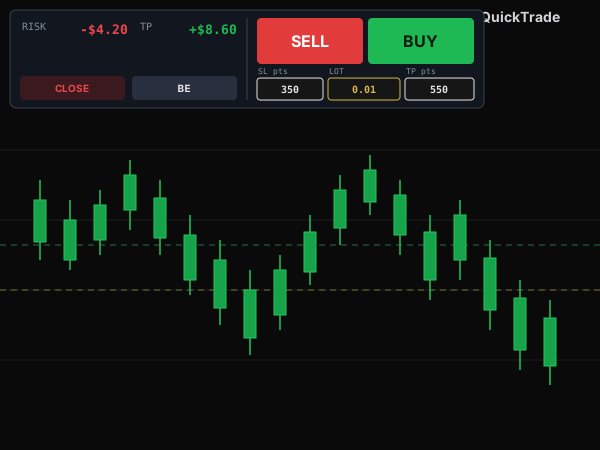
A high-speed MT5 order-entry EA — BUY/SELL with TP/SL computed from points, plus combined RISK/TP tracking, CLOSE and BE in one panel.
Completely free — every future feature upgrade and bug fix is free as well.
Features
- BUY/SELL enters immediately with TP/SL computed from the entry price using preset points.
- Leave SL/TP at 0 to open a trade without one on that side — flexible per strategy.
- Combined RISK & TP: total loss if every trade hits SL, total profit if every trade hits TP — shown side by side.
- CLOSE: closes only this EA's own trades (by Magic number, leaves manual and other EAs' trades alone).
- BE: moves every trade's SL to entry plus a custom profit offset.
- Panel docks to 3 positions (top-left/top-center/top-right) + MarginX/Y.
- Large SELL/BUY buttons, built for fast mouse clicks without needing to aim precisely.
Guide
- Download QuickTrade.ex5 to your computer.
- Open MetaTrader 5, go to File → Open Data Folder → MQL5 → Experts and copy the .ex5 file in.
- Back in MT5, right-click Navigator → Refresh.
- Fastest way: double-click Quick Trade in the Navigator — the panel pops up on the chart.
- (Or just drag Quick Trade from the Navigator onto a chart.)
- When the dialog appears, tick "Allow Algo Trading" and click OK; make sure the Algo Trading button on the toolbar is on.
- Note: test on a demo account before going live.
Inputs
- Default lot (DefaultLot)
- lot pre-filled in the LOT field. Default: 0.01.
- Max lot (MaxLot)
- blocks any order larger than this lot. Default: 0.10.
- Default SL (DefaultSLpts)
- SL points pre-filled when the EA is attached. Default: 350.
- Default TP (DefaultTPpts)
- TP points pre-filled when the EA is attached. Default: 550.
- BE offset (BEOffsetPoints)
- points added when moving the SL to break-even (small profit). Default: 10.
- Panel position (PanelPos)
- top-left / top-center / top-right. Default: top-right.
- Horizontal / vertical margin (MarginX / MarginY)
- panel distance (px) from the chart edge.
- Slippage
- max allowed slippage in points when filling orders. Default: 30.
- Enable sound (EnableSound)
- play a sound on a successful / failed order or management action.
- Magic number (MagicNumber)
- magic that tags the EA's orders. Default: 686868.
Got questions?
I'm always excited to collaborate on innovative and exciting projects!
E-mailhuyq09@gmail.com
Phone0834 564 869