IndicatorFree
MTF Panel
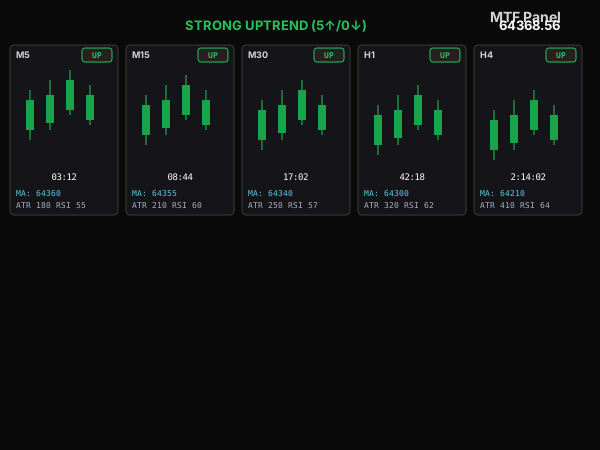
An MT5 indicator that draws 5 side-by-side mini-charts (M5→H4) on one chart — a multi-timeframe overview panel without opening extra windows.
Features
- 5 fixed timeframes M5, M15, M30, H1, H4 — each panel auto-scales its recent candles by high/low.
- Real-time MA10 line across the candles, with a per-timeframe UP/DOWN badge.
- Bar-close countdown (mm:ss, h:mm:ss on H4) right under the center candle.
- Top/bottom FLAGs (▼/▲) from ZigZag at each timeframe's nearest swing.
- Bollinger Bands and ATR/RSI shown under each panel — independently toggleable, panel shrinks when fewer are on.
- Overall trend badge (majority ≥3/5, all 5 aligned → STRONG) plus the current price.
- Eye-icon toggle button + hotkey (default 'H') to quickly hide/show the whole panel.
Guide
- Download mtf.ex5 to your computer.
- Open MetaTrader 5, go to File → Open Data Folder → MQL5 → Indicators.
- Copy the .ex5 file into the Indicators folder, go back to MT5 and right-click Navigator → Refresh.
- Fastest way: double-click MTF Panel in the Navigator — the 5-timeframe panel pops up on the chart.
- (Or just drag MTF Panel from the Navigator onto a chart.)
- Requires the standard "Examples\ZigZag" indicator (bundled with every MT5 install) to draw the top/bottom flags; if missing, flags turn off automatically and the rest keeps working.
- Note: test on a demo account before going live.
Inputs
- Show Bollinger Bands (ShowBB)
- shows 2 BB lines under each panel. Default: on.
- Show ZigZag (ShowZZ)
- shows the ZigZag line + top/bottom flags. Default: on.
- Show ATR (ShowATR) / Show RSI (ShowRSI)
- shows the last indicator row. Default: both on.
- MA/ATR/RSI/BB periods (MAPeriod/ATRPeriod/RSIPeriod/BBPeriod)
- per-indicator settings.
- ZigZag Depth/Deviation/Backstep
- standard ZigZag parameters.
- Panel position & size (PanelX/Y, ColWidth, ChartHeight, BarsToShow, ColGap)
- 5-column layout.
- Candle/badge/flag colors (ColBull/ColBear/ColUp/ColDown/ColFlag...) and Font/FontSize.
- Show panel on start (StartVisible)
- default on.
- Toggle hotkey (ToggleKey)
- single character to quickly hide/show the panel. Default: 'H'.
- Redraw rate (RefreshMs)
- panel refresh interval in ms. Default: 250.
Got questions?
I'm always excited to collaborate on innovative and exciting projects!
E-mailhuyq09@gmail.com
Phone0834 564 869