IndicatorFree
B-Clock
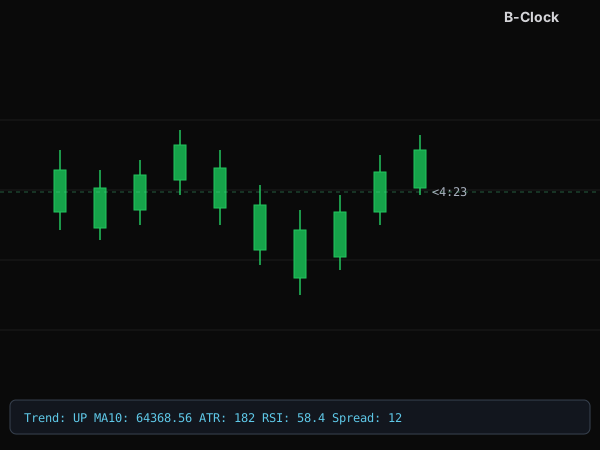
An MT5 indicator that shows a bar-close countdown right next to the price, plus Trend/ATR/RSI/Spread on the chart's Comment line.
Features
- Bar-close countdown (mm:ss) shown right next to the current price on the chart.
- Compact Comment line: Trend (via MA), ATR in points, RSI and Spread — each toggleable.
- Trend is determined by price vs. a configurable-period MA.
- Customize font color, size, font family and the clock's offset from price.
- Lightweight — draws nothing extra beyond the countdown label.
Guide
- Download b-clock.ex5 to your computer.
- Open MetaTrader 5, go to File → Open Data Folder → MQL5 → Indicators.
- Copy the .ex5 file into the Indicators folder, go back to MT5 and right-click Navigator → Refresh.
- Fastest way: double-click B-Clock in the Navigator — it attaches to the current chart instantly.
- (Or just drag B-Clock from the Navigator onto a chart.)
- Note: test on a demo account before going live.
Inputs
- Font color (FontColor)
- countdown label color. Default: dark gray.
- Font size (FontSize)
- countdown label size. Default: 10.
- Font (FontName)
- countdown font family. Default: Tahoma.
- Price offset (Offset)
- distance (points) between the clock and the current price. Default: 5.
- Show Comment (ShowComment)
- toggles the whole Comment line. Default: on.
- Show Trend (ShowTrend)
- shows trend direction via MA. Default: on.
- MA period (MAPeriod)
- period of the MA used for Trend. Default: 10.
- Show ATR (ShowATR)
- shows ATR in points. Default: on.
- ATR period (ATRPeriod)
- ATR period. Default: 14.
- Show RSI (ShowRSI)
- shows RSI. Default: on.
- RSI period (RSIPeriod)
- RSI period. Default: 14.
- Show Spread (ShowSpread)
- shows current spread in points. Default: on.
Got questions?
I'm always excited to collaborate on innovative and exciting projects!
E-mailhuyq09@gmail.com
Phone0834 564 869